Ghost CMS integrations that enable automated publishing at scale

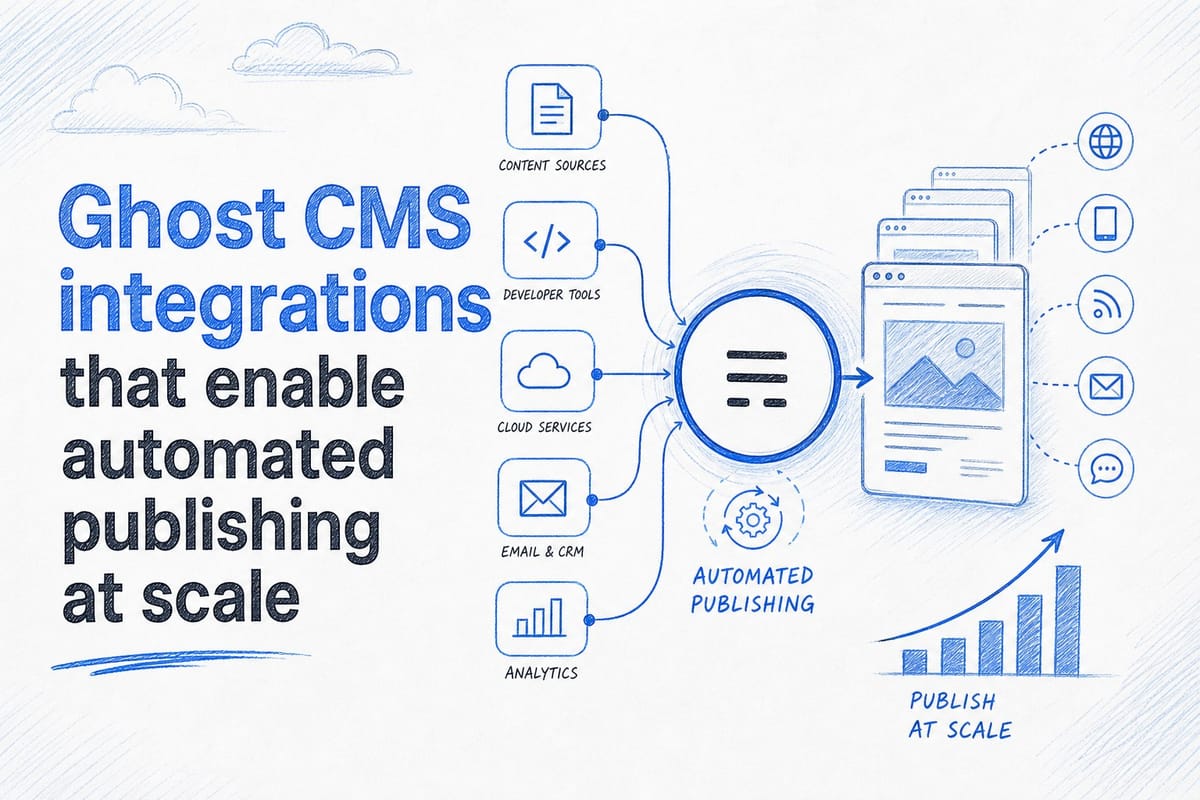
Table of contents
1. Why Ghost is built for integration-first publishing
2. Building an automated content pipeline that feeds Ghost
3. Specific integrations worth setting up for Ghost right now
Ghost CMS has earned a loyal following among bloggers, SaaS founders, and digital marketers who want a clean, fast publishing platform without the bloat of WordPress. But Ghost on its own is only part of the picture. The real power shows up when you connect it to the right tools and start automating the work that usually eats your week. In this article, I want to walk through the Ghost CMS integrations that actually matter for scaling your publishing, and show you how to build a system that keeps your blog running even when you are not sitting at your desk.
Why Ghost is built for integration-first publishing
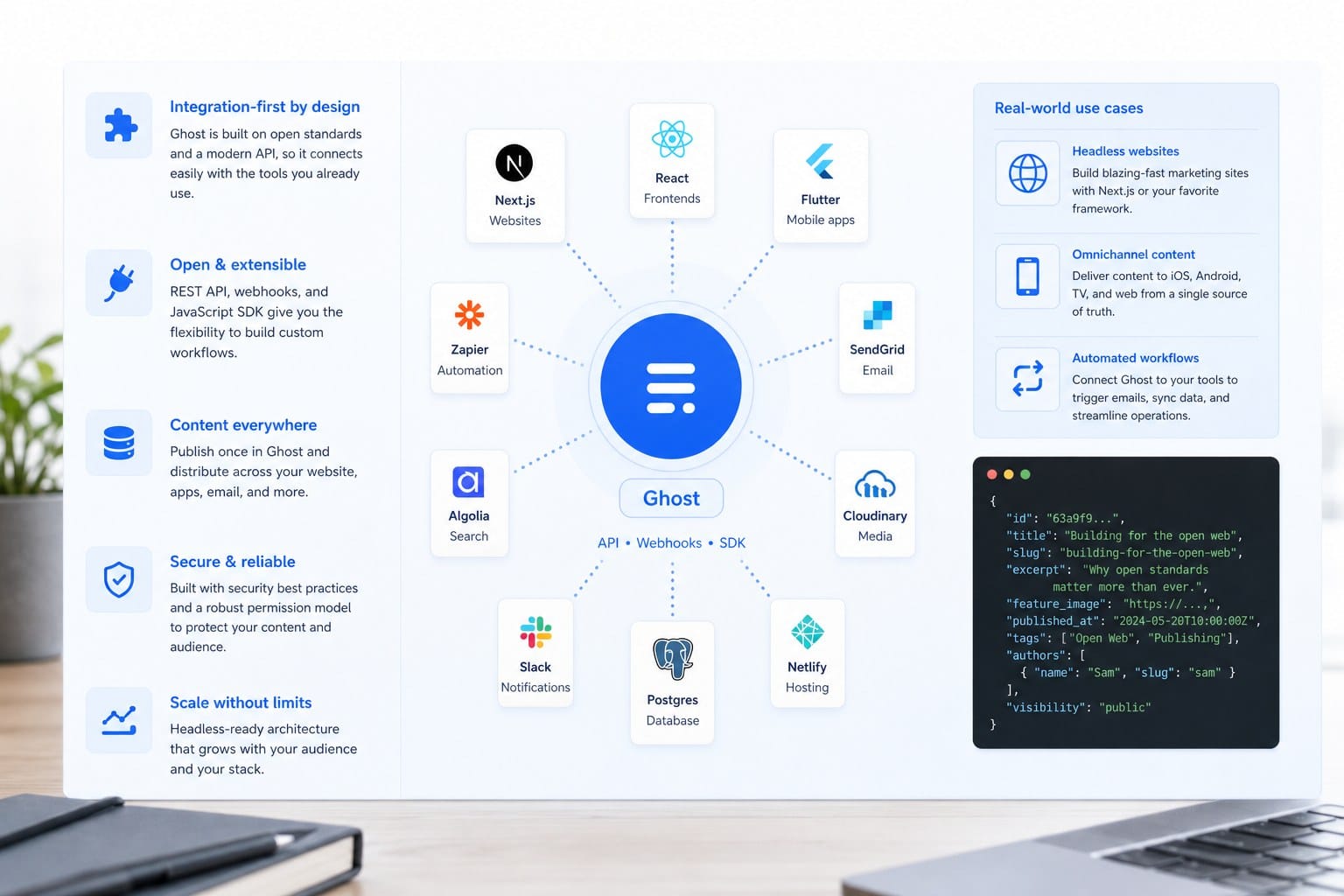
Ghost was designed with developers and content teams in mind. Its architecture is clean, its API is well-documented, and it supports native webhooks out of the box. That combination makes it unusually easy to wire up automation tools without needing a custom backend or a team of engineers.
At its core, Ghost exposes a Content API and an Admin API. The Content API lets external tools read your published posts, tags, and author data. The Admin API lets those same tools create posts, update them, manage members, and trigger publishing actions. Together, those two endpoints are the foundation for almost every serious Ghost CMS integration you will find in the wild.
When I talk about scaling publishing, I mean going from posting once or twice a month to maintaining a consistent weekly or bi-weekly output without manually writing, formatting, and scheduling every single article. That is not realistic for a solo blogger or a small marketing team unless the workflow is automated. Ghost makes that automation possible, but you still need to know which tools to connect and how.
Let me start with the category of integrations most Ghost users reach for first: automation platforms.
Zapier and Make (formerly Integromat)
Zapier and Make are middleware tools. They sit between Ghost and your other apps and move data or trigger actions based on rules you set. For Ghost users, the most common use cases are:
- Pushing a new post notification to Slack when an article is published - Syncing published posts to a Notion or Airtable content calendar - Triggering an email sequence in Mailchimp or ConvertKit when a post goes live - Logging new subscribers from Ghost's membership feature into a CRM
Zapier has a native Ghost integration that connects to both the Content API and the Admin API. Make offers similar functionality with more granular control over data mapping, which is useful if you are running more complex multi-step workflows.
For example, imagine you publish a new blog post on a Monday morning. A Zapier automation can immediately post a formatted summary to your brand's LinkedIn page, add the article URL to a Buffer queue for social scheduling, and log the post title and date in a Google Sheet you use to track content performance. That sequence used to take 20 to 30 minutes of manual work. With a properly configured Zap, it takes zero.
Webhooks for real-time triggers
Ghost supports outgoing webhooks natively. A webhook fires an HTTP POST request to a URL you define whenever a specific event happens inside Ghost, such as a post being published, a member subscribing, or a tag being updated.
This is powerful because it removes the polling delay you get with some third-party integrations. Instead of a tool checking Ghost every 15 minutes to see if anything changed, Ghost itself pushes the signal the moment an event occurs.
If you use a custom backend or a no-code tool like n8n, you can listen for those webhook events and trigger almost any downstream action you want. Post translation, Slack alerts, content archiving, SEO indexing pings, the list is long.
Connecting Ghost to your SEO toolchain
Publishing consistently is only valuable if search engines can find and index your content. Several integrations help close that gap. Google Search Console does not have a direct Ghost integration, but you can use a webhook plus a simple script to submit new post URLs to the Indexing API as soon as they publish. Some Ghost users also pipe their published post data into tools that track keyword rankings over time, giving them a feedback loop between what they publish and how it performs.
If you are evaluating your options here, it is worth reading about Surfer SEO alternatives for bloggers who want an all-in-one writing and publishing tool. The piece covers several tools that sit upstream of Ghost and can feed SEO-optimized content directly into your publishing pipeline.
Email and membership integrations
Ghost has a built-in newsletter feature that sends posts directly to paid or free members. But many teams want to use a dedicated email platform alongside Ghost. Mailchimp, ConvertKit, Beehiiv, and ActiveCampaign all have workable Ghost integrations, mostly via Zapier or direct API calls.
The standard setup sends a tagged segment email whenever a post goes live, pulling the post excerpt and URL automatically. This keeps your email list engaged without requiring you to manually draft a newsletter every time you publish.
Headless Ghost for custom front ends
Some more technical Ghost users run Ghost in headless mode, meaning Ghost handles content storage and the Admin API, but the front end is built in something like Next.js, Gatsby, or Nuxt. This setup gives you full control over how content is rendered and cached.
Headless Ghost integrations often involve connecting the Content API to a static site generator. When a post is published or updated, a webhook fires, triggering a rebuild of the static front end. The result is a site that loads extremely fast and scales under heavy traffic without touching the Ghost server directly.
This is not for everyone, but it shows how flexible the Ghost integration layer really is.
Building an automated content pipeline that feeds Ghost
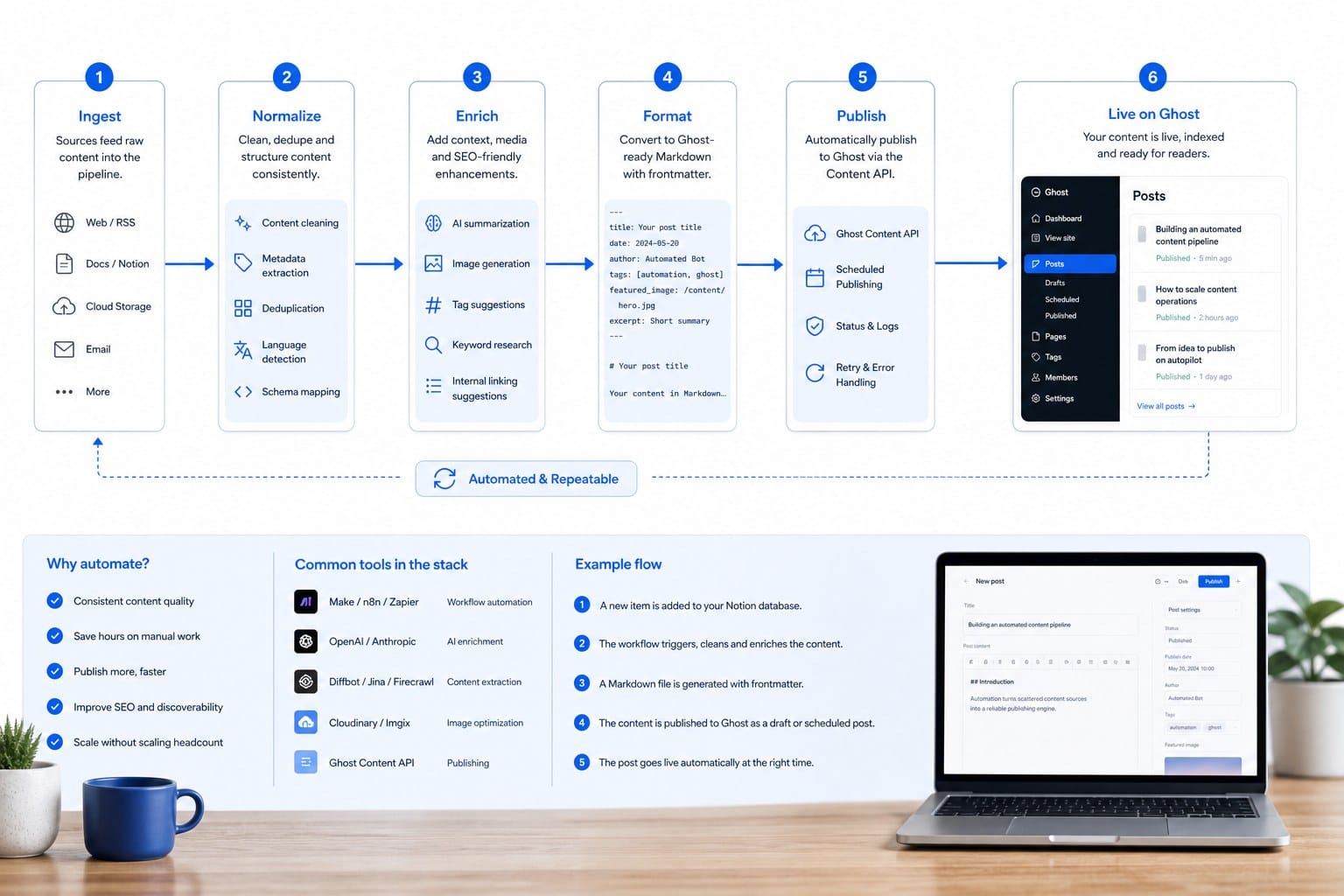
Integrations that live inside Ghost are valuable, but the more important automation question is how content gets into Ghost in the first place. Most teams spend the majority of their publishing time on research, writing, editing, and formatting. If you can automate those upstream steps, the integrations I covered above become dramatically more powerful because they are moving content through a pipeline rather than just routing signals.
This is where I want to be specific about what a real automated publishing pipeline looks like, because a lot of people imagine it as a simple "AI writes post, post goes live" loop. The reality is more structured than that.
Step one: Content strategy and topic planning
A publishing pipeline starts with a topic queue. Without one, you are always starting from scratch each week, which creates friction and inconsistency. The best automated workflows begin with a 30-day or 90-day content calendar that maps topics to target keywords, content formats, and audience intent.
Building that calendar manually is time-consuming. You have to research keywords, assess competition, map topics to your funnel, and sequence articles so they support each other with internal links. If you want to understand what goes into this kind of planning, What is a blog content strategy and why every brand needs one is a good starting point.
Once you have a topic queue, you can feed it into your writing workflow systematically instead of deciding each week what to write about.
Step two: Research and content generation
This is the step that most bloggers manually spend the most time on. Good long-form content requires reading sources, synthesizing information, structuring an argument, writing clearly, and editing for tone. That can easily take four to eight hours per article.
AI writing tools have matured enough to handle a meaningful portion of this work, especially for research-heavy informational articles. The important thing is that the tool is producing content that reflects your brand voice, matches your keyword targets, and meets a quality bar that makes publishing it worthwhile. Generic AI output does not meet that bar. Deeply researched, structured content that is then reviewed and refined before publishing does.
This is exactly what Blogtude is built to do. It generates a 30-day content strategy, produces deeply researched long-form articles with on-brand visuals, and publishes directly to Ghost using the Admin API. You review and approve, but the heavy lifting is handled. It is a practical example of what a complete Ghost CMS integration stack looks like when content generation, strategy, and publishing are all connected.
Step three: Formatting and media handling
One underrated friction point in publishing workflows is formatting. Even if you have a finished draft, you still need to add the featured image, set the meta title and description, assign tags, choose the author, set the publish date, and sometimes add internal links or a custom excerpt.
When you use the Ghost Admin API to publish programmatically, you can pass all of those fields as part of the API call. That means a well-built publishing integration handles the entire post object, not just the body copy. The article arrives in Ghost ready to publish, not as a rough draft you still need to configure.
This matters a lot at scale. If you are publishing four to eight articles a month, spending five minutes on formatting per post is fine. If you are publishing twenty or more, those minutes add up and the process starts breaking down.
Step four: Scheduling and distribution
Ghost lets you schedule posts for future publication natively. When you create a post via the Admin API, you can set the status to "scheduled" and pass a publish date. The post will go live automatically at that time.
Combined with a content calendar, this means you can batch your publishing work into a single session. Create the articles, approve them, set the schedule, and then step away. The blog keeps publishing on its own throughout the month.
After each post goes live, the downstream integrations I described earlier take over. Social posts get queued, emails get triggered, analytics get logged. The whole system runs without manual intervention.
If you want a detailed look at how to design this kind of workflow, How to build a blog content workflow that runs without you breaks it down step by step.
Handling visuals in an automated pipeline
One piece of automated publishing that often gets overlooked is images. Ghost supports featured images and inline images within post content. Sourcing those manually from stock photo sites, resizing them, and uploading them adds time to every article.
A fully automated pipeline handles images programmatically. This might mean pulling from a licensed image API based on the article topic, generating on-brand visuals using an AI image tool, or maintaining a pre-approved image library that the pipeline draws from based on content tags. Whatever the approach, the goal is that images arrive with the article rather than requiring a separate manual step.
Blogtude includes on-brand visuals as part of its content generation process, which solves this problem in the context of automated Ghost publishing specifically.
Managing drafts, review, and approval
Full automation does not mean zero human involvement. Most teams want a review step before a post goes live, especially for brand-sensitive content or technical subjects where accuracy matters.
A good automated pipeline posts new articles as drafts in Ghost automatically, then notifies the editor or founder via Slack, email, or a project management tool. The reviewer opens the post, reads it, makes any needed adjustments, and approves it for publishing. The actual publishing can still be automated based on the schedule, or the reviewer can hit publish manually after approval.
This review-and-publish model keeps humans in the loop without requiring them to do the research, writing, or formatting. That is a sustainable pace for a solo operator or a small team.
Specific integrations worth setting up for Ghost right now
I want to get concrete here and walk through the specific Ghost CMS integrations that deliver the most value for teams focused on consistent, scalable publishing. These are not theoretical. They are the connections that make a real difference in how much content you ship and how much time it costs you.
Ghost and Slack
This is a low-effort, high-value integration. When a post is published, a Slack message fires to your content channel with the post title, URL, and any other metadata you want to include. This keeps your team informed without anyone having to check the Ghost dashboard. It also creates a lightweight record of publishing activity directly in a tool your team already uses.
You can set this up with a Zapier Ghost trigger and a Slack action in about 10 minutes. If you want more control over the message format or need to route alerts to different channels based on post tags, Make handles that more cleanly.
Ghost and Buffer or Hootsuite
Social distribution is one of the most time-consuming parts of content marketing when done manually. Connecting Ghost to a social scheduling tool automates that entirely. When a post publishes, the integration pulls the title, excerpt, and featured image and queues a post to your connected social accounts.
Buffer has a decent Zapier integration. Hootsuite does too. Some teams also use a custom webhook to push directly to social scheduling APIs if they want more control over the post copy or timing.
The important thing is that social promotion happens automatically and consistently, not just when someone remembers to do it.
Ghost and ConvertKit or Mailchimp
If you use Ghost's native newsletter feature, you may not need a separate email integration. But if you are running a more sophisticated email program with segmentation, automations, and tagging, connecting Ghost to ConvertKit or Mailchimp adds real value.
A common setup: when a post with a specific tag publishes in Ghost, trigger an email campaign to the matching subscriber segment in ConvertKit. This lets you send targeted content updates to specific parts of your list rather than emailing everyone about every post.
For membership-driven Ghost sites, you can also sync new member signups into your email platform automatically, triggering welcome sequences or drip campaigns without any manual imports.
Ghost and Google Analytics or Fathom
Tracking content performance is essential if you want to improve over time. Ghost does not have deep built-in analytics, but it supports adding tracking scripts via the Code Injection settings. Google Analytics and Fathom both work well this way.
For more automated reporting, you can use a tool like Google Looker Studio to pull data from Google Analytics and display post-level performance metrics in a dashboard. Set that dashboard to send you a weekly email summary and you have automated your analytics reporting alongside your publishing workflow.
Ghost and Airtable or Notion for content tracking
Content teams often want a central place to track what has been published, what is planned, and how each piece is performing. Airtable and Notion are common choices.
You can automate this with a Zapier workflow that creates a new record in Airtable or Notion every time a post publishes in Ghost. Include fields for the post title, URL, publish date, tags, and author. Over time this becomes a searchable content archive that is useful for audits, internal linking, and planning future topics.
Ghost and Algolia for search
Ghost has basic built-in search, but Algolia is a significantly more powerful option for sites with large content libraries. The Ghost-Algolia integration keeps your Algolia search index in sync with your Ghost content automatically. When a post is published, updated, or deleted, Algolia is updated in real time.
This matters for user experience, especially on content-heavy sites where readers use search frequently. It also matters for internal tooling if you are using Algolia to power any kind of content recommendation or related-posts feature.
Ghost and Zapier for custom publishing triggers
One underused pattern is using Zapier to trigger Ghost post creation from an external source. For example, you could:
- Create a new draft in Ghost automatically when a row is added to a Google Sheet with an article title and brief - Push content approved in a project management tool like Asana directly into Ghost as a scheduled post - Pull content generated by an external AI pipeline and create a Ghost draft via the Admin API, ready for review
This last use case is exactly what a tool like Blogtude handles. The content pipeline runs externally, generates a fully formatted article, and uses the Ghost Admin API to deliver it to your Ghost instance as a draft or scheduled post. You get the article in Ghost without ever having to log into the content generation tool and manually copy-paste anything.
Ghost and n8n for self-hosted automation
If you prefer not to route your content through third-party automation platforms like Zapier, n8n is a self-hosted alternative. It supports the Ghost API natively and gives you the same workflow capabilities with more privacy control and lower per-task costs at scale.
For high-volume publishing operations, n8n can be more economical than Zapier, especially once you are running dozens of automated workflows across a large content library.
A note on API rate limits and reliability
When you are automating publishing at any real scale, it is worth understanding Ghost's API rate limits. The Admin API is designed for programmatic use, but like any API it has limits on request frequency. If you are publishing a large batch of articles at once, build in delays between API calls to avoid hitting those limits and causing publishing failures.
Also, build error handling into your workflows. If an API call fails, you want an alert so you can investigate, rather than silently losing a post that was supposed to go live. Most automation platforms support error notifications natively.
Putting it all together
The Ghost CMS integrations that matter most are the ones that eliminate manual steps from your publishing process. Social distribution, email campaigns, analytics tracking, content calendar updates, and member management can all run automatically once you have the right connections in place.
But the most valuable integration of all is one that handles content creation itself. Because no matter how smooth your publishing workflow is, it only works if you have a steady stream of high-quality articles to push through it. That is the problem Blogtude is built to solve for Ghost users specifically. It handles the strategy, the writing, the visuals, and the publishing, so the blog keeps moving forward without requiring you to personally drive every article from idea to live post.
If you are a Ghost user trying to scale content without scaling headcount, this is the direction worth exploring.

Ready to take the next step?
Blogtude is an AI-powered content engine built for Ghost users who want consistent, high-quality blog output without doing all the work manually. It generates a full 30-day content strategy, produces deeply researched long-form articles with on-brand visuals, and publishes directly to your Ghost site through the Admin API. If you are ready to build a publishing workflow that runs without you, visit blogtude.com to get started.