How to build a blog content workflow that runs without you


Table of contents
1. Why most blog workflows break down (and what a real automated one looks like)
2. How to build your blog content workflow automation step by step
3. Making your automated workflow sustainable and improving it over time
Most bloggers and content teams hit the same wall at some point. Publishing feels great when you have time, but the moment life or work gets busy, the blog goes quiet for weeks. I have talked to SaaS founders who had a blog they updated twice and then abandoned. I have talked to small business owners who spent an entire Saturday writing one post, only to wonder if anyone would even read it. The problem is almost never a lack of ideas. It is a lack of a repeatable system. A solid blog content workflow automation setup changes that. It moves content production from something that depends on your availability to something that runs on its own schedule, producing consistent output whether you are in the office or on vacation. This article walks you through exactly how to build that kind of workflow, from planning to publishing, so your blog keeps moving even when you are not actively pushing it.
Why most blog workflows break down (and what a real automated one looks like)
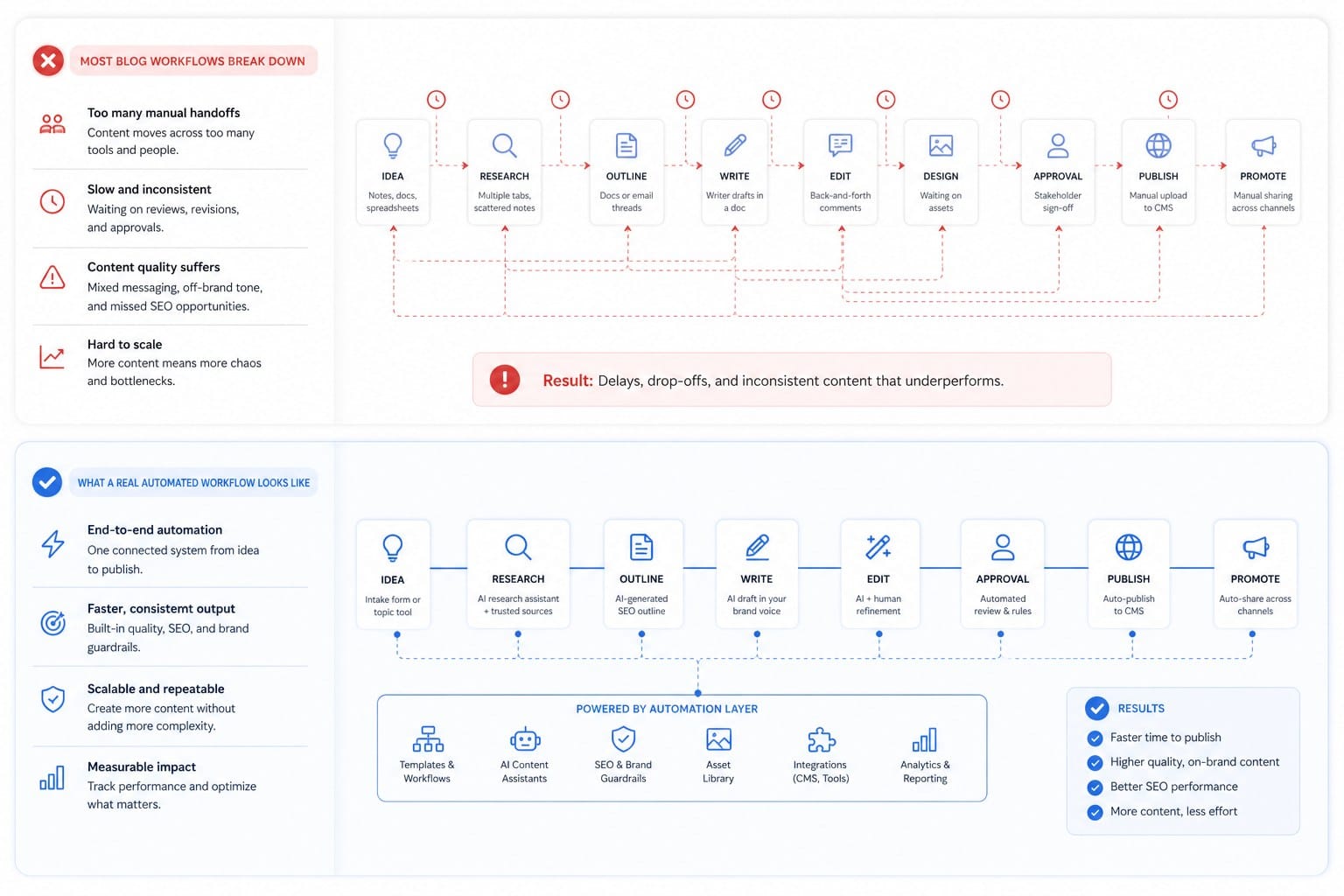
Let me describe a workflow I see constantly. Someone decides to start blogging seriously. They research a topic, open a Google Doc, write a draft over a couple of evenings, find some images, format it in their CMS, hit publish, and then share it once on LinkedIn. Two weeks later, they do it again. Then something urgent comes up at work. The blog sits untouched for a month. Then two months. Then it becomes a thing they feel vaguely guilty about.
This is not a motivation problem. It is a systems problem. The workflow I described depends entirely on one person having the time, energy, and mental bandwidth to execute every single step manually. The moment any of those conditions change, the workflow collapses.
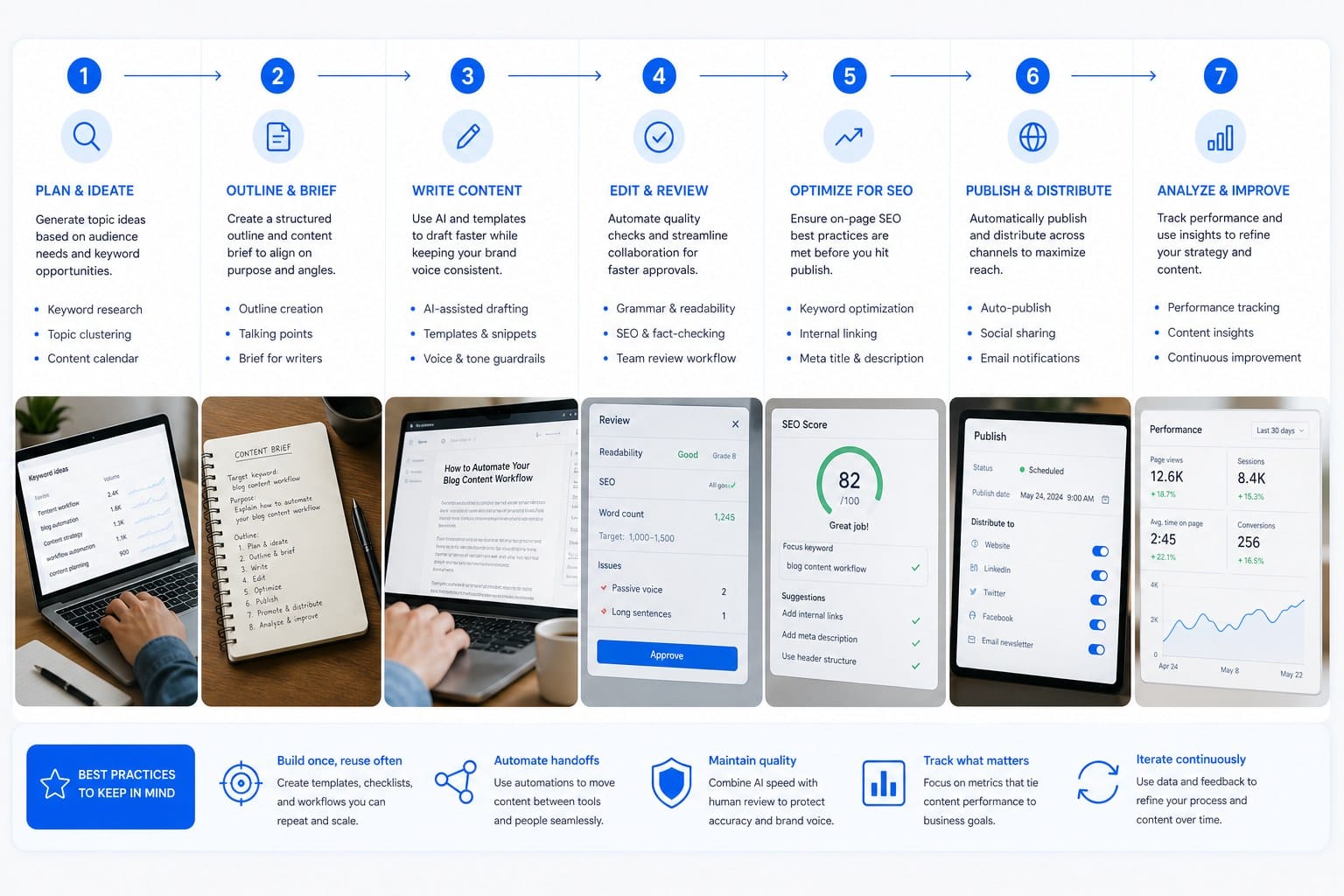
A real automated blog content workflow looks different. Instead of a chain of manual steps that one person has to push through, it is a pipeline where most of the work happens automatically, and the human role shrinks to decisions and approvals rather than execution.
Here is what that pipeline typically includes.
First, there is a content calendar that is not just a spreadsheet you fill in yourself. It is generated based on your niche, your target keywords, and a planned publishing frequency. The topics are researched and selected based on what your audience is actually searching for, not just what sounds interesting to you that week.
Second, there is a drafting layer. This is where automation does the heaviest lifting. AI tools can research a topic, structure an outline, and produce a full long-form draft that is ready for review. The key word there is review, not rewrite. A good automated system produces a draft that is 80 to 90 percent ready, not a rough pile of words you have to completely redo.
Third, there is a formatting and visual layer. Blog posts do not live as plain text. They need header images, sometimes section images, and proper formatting inside the CMS. When this step is automated, the tool handles image selection or generation and applies your brand style without you opening a design program.
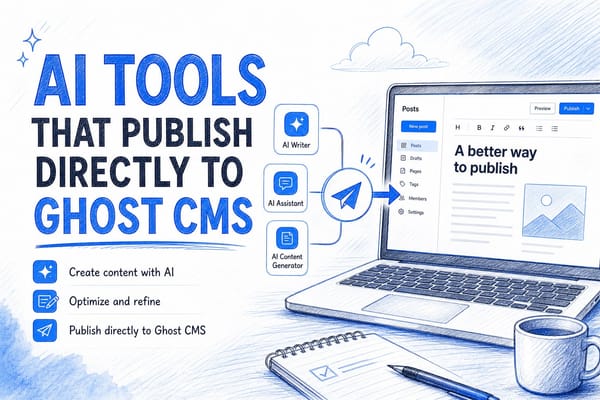
Fourth, there is publishing. The post goes from draft to live on your website on a scheduled date, without you logging into your CMS and clicking buttons. For platforms like Ghost, this can be fully hands-off once the draft has been approved.
Fifth, there is distribution. After publishing, the post can be automatically shared or queued for social media, added to an email digest, or fed into other channels, again without manual work.
When all five of those layers are connected and running, you have a blog content workflow automation that genuinely operates without you in the loop for most of its tasks. Your involvement becomes strategic, things like approving the monthly content plan, reviewing a draft that needs a specific personal story, or adjusting the strategy based on what is working. The day-to-day grinding disappears.
It is worth being honest here about what automation does not do. It does not replace genuine expertise or personal experience. The best automated posts still need a human perspective layered in somewhere, whether that is at the topic-selection stage, during a quick draft review, or in a brief edit pass. What automation eliminates is the administrative and mechanical work: research, formatting, scheduling, publishing, and repetitive task management. That is where most of the time goes, and that is where the savings are dramatic.
For a SaaS founder who wants to publish four times a month, a working automated workflow can cut the actual human time required from twelve or more hours down to under two. For a digital marketer managing multiple brand blogs, it can mean the difference between keeping up with a publishing schedule and constantly falling behind.
I also want to address a concern I hear often. People worry that automated content will feel generic or robotic. This is a real risk with poorly configured systems. But when the workflow is set up correctly, with your brand voice, your target audience, your specific topics, and your content standards built into it, the output reads like something your team produced, not something that came off an assembly line. The setup work is what makes the difference.
How to build your blog content workflow automation step by step
Building this kind of workflow is not something that happens in an afternoon. It takes deliberate setup work upfront. But once it is built, the ongoing effort becomes minimal. Here is how to approach it.
Step one: Audit what you have and define your publishing goal
Before you automate anything, take stock of your current situation. How often are you publishing? What topics have you covered? What has performed well, and what flopped? If your blog is new, this step is simpler since you are mostly defining goals rather than auditing history.
Set a clear, specific publishing goal. Not 'more content' but something like 'four posts per month on topics related to project management software for small teams.' The more specific you are here, the better your automated system can serve you.
Your publishing frequency matters too. Weekly is aggressive if you are doing this solo, but entirely achievable with automation. Biweekly is very manageable. Monthly is a good starting point if you want to keep quality high while you are still learning how to review and shape AI-generated content.
Step two: Build your content strategy layer
This is where most DIY automation attempts fall short. People set up a tool to write posts, but they feed it random topics with no strategic connection. The result is a blog that publishes consistently but never builds topical authority or ranks for anything meaningful.
A proper content strategy layer answers these questions: What are the core topics your blog should own? What specific keywords is your audience searching for within those topics? How do the topics connect to each other so internal linking makes sense? What content types (how-to guides, comparisons, deep dives, listicles) work best for your audience?
If you are building this manually, you will want to do keyword research using a tool like Ahrefs or Google Search Console, map out topic clusters, and plan your calendar around a mix of high-volume and low-competition keywords. This is legitimate work that requires real thought.
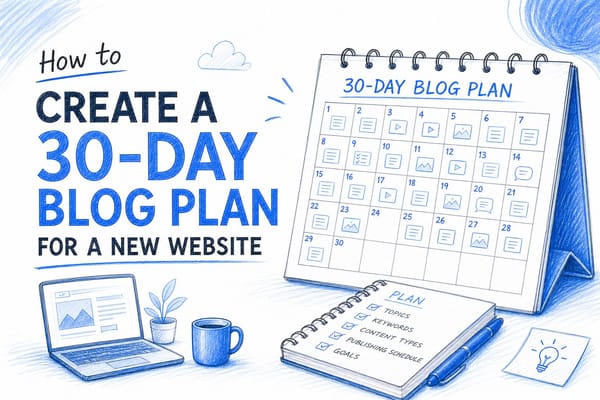
If you want to skip most of this manual effort, tools like Blogtude handle this layer for you. The platform generates a full 30-day content strategy built around your niche and audience, so you start with a coherent plan rather than a blank calendar.
Step three: Create your brand voice document
Every automated content system needs guardrails. Your brand voice document is what tells the system (and anyone who reviews output) what good looks like for your blog specifically.
This document should include:
Your target reader: who they are, what they know, what they are trying to solve.
Tone descriptors: are you formal or casual? Technical or plain-language? Direct or nurturing?
Things you always do: use second person, include practical examples, cite real data where possible.
Things you never do: use jargon your audience would not know, make claims you cannot support, write in a way that sounds like a press release.
Sample sentences or phrases that feel right, and ones that feel wrong.
This document becomes the reference point for reviewing automated drafts. When a draft comes back and something feels off, you can point to exactly why and adjust the system accordingly.
Step four: Set up your drafting automation
This is the core of the workflow. Your drafting automation takes a topic and keyword from your content calendar and produces a full, researched, long-form draft.
The quality of this output depends heavily on how well you have configured the inputs. A prompt that says 'write about project management' produces very different results than one that includes your audience definition, your brand voice parameters, a target word count, a desired structure, and specific angles to cover.
For bloggers who want to explore different tools in this space before committing to one, it is worth looking at a range of options. I have written previously about Surfer SEO alternatives for bloggers who want an all-in-one writing and publishing tool and Copy.ai alternatives for full blog automation, both of which cover the landscape of tools that handle content creation at different levels of automation.
What separates a genuinely automated drafting system from a basic AI writing tool is the depth of research. A good automated draft does not just string together sentences about a topic. It synthesizes information, structures the post for readability and SEO, includes relevant examples, and applies your brand voice throughout. When you get that kind of output, your review pass takes fifteen minutes instead of two hours.
Step five: Build your review and approval step
I want to be clear about something: a review step is not optional, even in a highly automated workflow. You should not let content go live on your blog without a human having looked at it. Not because the AI output will be bad, but because you are the one responsible for what your brand says publicly, and a quick review catches anything that needs adjustment before it reaches your audience.
The good news is that in a well-designed automated workflow, the review step is fast. You are not editing from scratch. You are scanning for accuracy, adding a personal example if one fits, checking that the tone is right, and approving. For most posts, that takes twenty minutes or less.
Set up a simple approval process. This might be a shared folder where drafts land for review, a Slack message that notifies you when a draft is ready, or a CMS workflow that holds posts in draft status until you mark them approved. The specific tool matters less than having the step clearly defined.
Step six: Automate publishing and formatting
Once a draft is approved, the final mile of your blog content workflow automation takes over. This is where the post moves from draft to live, properly formatted, with the right images, the right metadata, and scheduled for the right date.
For Ghost CMS users, this integration is particularly clean because Ghost has a solid API that lets external tools push content directly into the platform with full formatting intact. If you are running a blog on Ghost and you have not explored automated publishing integrations yet, it is one of the most time-saving moves you can make. Blogtude is built with Ghost integration as a core feature, which is part of why it resonates so strongly with bloggers and content teams already on that platform.
For other CMS platforms, the publishing automation works similarly. The tool formats the post, attaches the featured image, sets the metadata including title tags and descriptions, and either publishes immediately or schedules it for a future date.
One thing to configure in this step: internal linking. Your automated system should, where possible, link new posts to relevant existing posts on your blog. This builds topical authority and keeps readers moving through your site. Some tools handle this automatically; others require you to set it up with a list of existing URLs the system can draw from.
Making your automated workflow sustainable and improving it over time
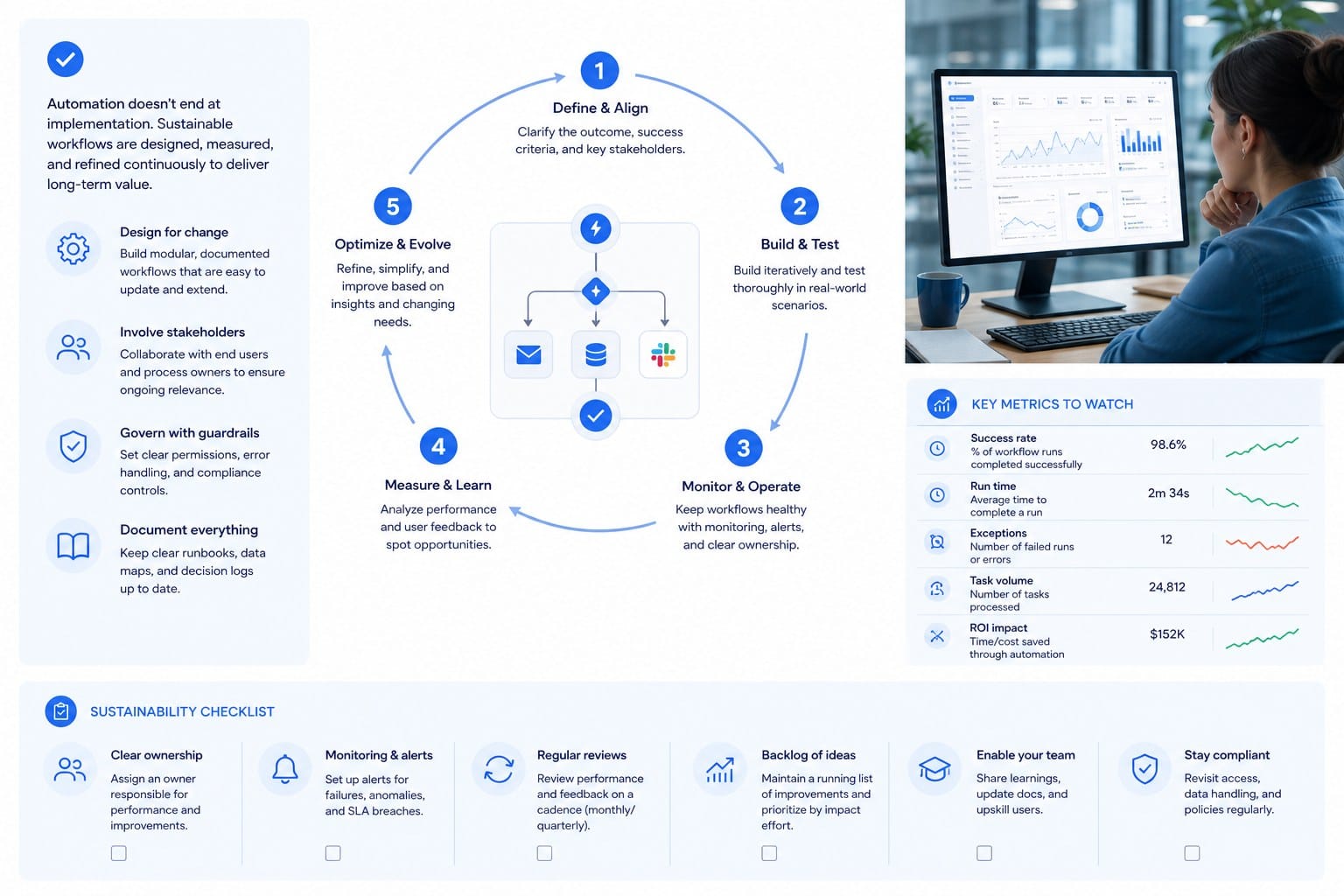
Building the workflow is one thing. Keeping it running well and improving it as you learn more is where long-term success comes from. Here is how to think about sustainability and ongoing optimization.
Start with a small pilot before scaling
If you are setting this up for the first time, resist the urge to immediately crank the volume to twelve posts a month. Start with four. Run the full workflow on those four posts from strategy to published. See where the friction is, what the output quality looks like, and how much time the review step actually takes you.
This pilot phase is where you refine your brand voice document, adjust your drafting prompts, and get comfortable with the approval process. It is much easier to improve a workflow when you are producing a manageable volume than when you are buried in a backlog of drafts waiting for review.
After a month or two of running at four posts, if everything is working smoothly, increase to your target volume. By that point, the system will be calibrated to your standards, and scaling up will not require proportional increases in your time.
Track performance so you can improve the strategy layer
Content that gets produced and published but never reviewed for performance is a wasted opportunity. Set a monthly reminder to check a few key numbers: organic traffic to your blog posts, which posts are ranking in search, which posts are getting read all the way through, and which ones get the most conversions or email signups.
This data feeds back into your content strategy layer. If you find that certain topic types consistently outperform others, adjust your upcoming calendar to favor those. If certain keywords are bringing in traffic you did not expect, write more content in that area.
The content strategy is not a set-it-and-forget-it document. It is a living plan that gets smarter as you accumulate real data about what works for your specific audience.
Keep your brand voice document current
Your brand voice and what your blog stands for will evolve over time. When it does, update the document. If you bring on a team member who is helping with review, make sure they have the current version. If your automated system uses the brand voice document as a reference input, make sure that updated version gets pushed to the system.
I have seen blogs drift away from their original voice over time simply because the brand voice document was written once and then forgotten. The posts started to feel different from each other because there was no consistent reference being applied. Keeping that document current is a small maintenance task with a big impact on output consistency.
Deal with content gaps proactively
Even a well-planned content calendar will occasionally have gaps. A topic that made sense three months ago might no longer be relevant. A keyword you planned to target might have become too competitive. Your business direction might have shifted.
Build in a monthly check of your upcoming content plan. Spend thirty minutes reviewing the next four to eight posts on the calendar. Are they still the right topics? Are they targeting the right keywords? Do they fit where your business is headed? This check is fast when the plan is well-organized, and it prevents you from publishing content that no longer serves your goals.
Know when to involve a human more deeply
Not every blog post is a good candidate for high automation. Some topics require deep personal experience or expertise that no automated system can generate. Some posts are strategic in a way that demands careful human thought. Some serve a specific conversion purpose that needs precise messaging.
For those posts, let the automation handle the research and structure, but plan to write more of the content yourself or bring in a subject matter expert. The workflow does not have to be binary. You can automate most posts while manually crafting the ones that need it.
This is an important distinction because it also protects your blog from becoming generic. When the highest-stakes content gets your full attention and the routine content is handled by the workflow, you end up with a blog that has consistent output at scale plus standout pieces that showcase real expertise.
Use your freed-up time strategically
This is worth saying plainly: the goal of blog content workflow automation is not just to publish more. It is to free you from the mechanical work so you can do the things that only you can do. That might be building relationships with other bloggers in your space for guest posts and backlinks. It might be appearing on podcasts or creating video content. It might be having actual conversations with your readers to understand what they need next. It might simply be having a weekend back.
The bloggers and content teams who get the most out of automation are the ones who reinvest their recovered time into high-leverage activities. They are not just publishing more; they are building bigger and better with the same amount of personal effort.
For anyone who is still evaluating what kind of automation tools are out there before committing to a full workflow, I would also point to this piece on Jasper AI alternatives for bloggers who want full autopilot publishing, which covers some of the landscape around tools that go beyond simple AI writing into fuller publishing automation.
The bottom line is this: a blog that runs without you is not a fantasy. It is a system. And like any system, it takes intentional design to build, honest evaluation to refine, and consistent maintenance to keep running well. But once it is running, the return on that upfront investment compounds every single month in the form of published content, growing organic traffic, and time you get to spend on things that matter more than manually formatting blog posts.
If you have been running your blog the manual way and feeling the weight of that, now is a good time to map out what your automated version would look like. Start with the five layers: strategy, drafting, review, formatting, and publishing. Figure out which ones you can automate first and work your way through. Even automating two or three of those layers will make a noticeable difference in how sustainable your publishing feels.
Ready to take the next step?
If you want to skip the manual setup and get a complete blog content workflow automation running fast, Blogtude handles the full pipeline for you. It builds your content strategy, researches and writes long-form posts, adds on-brand visuals, and publishes directly to Ghost and other CMS platforms on your schedule. You review and approve; the system does the rest. Visit Blogtude to see how it works and start your first 30-day content plan.