
How to integrate an AI blog tool with Ghost CMS

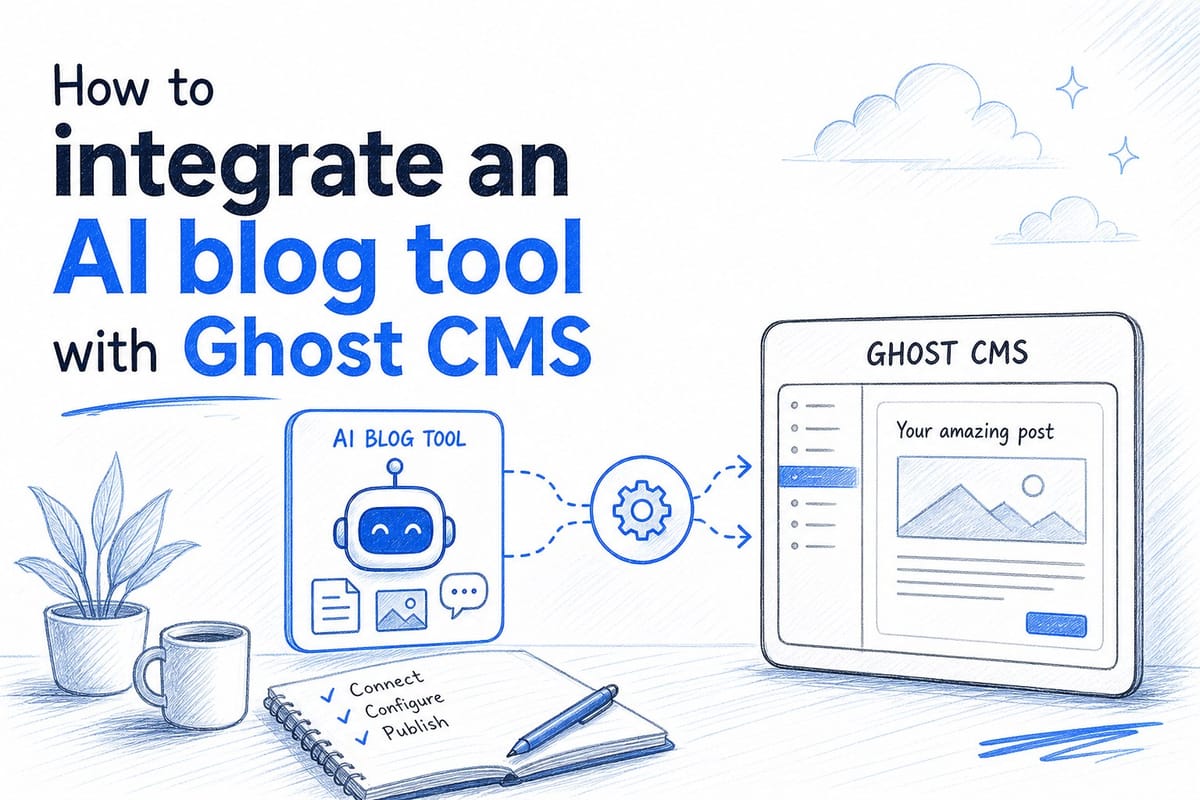
Table of contents
1. Why Ghost CMS users are turning to AI publishing tools
2. How the Ghost API integration actually works
3. Setting up Blogtude with Ghost for a fully automated content workflow
If you run a Ghost CMS site, you already know the platform is fast, clean, and built for serious publishing. The harder part is keeping a steady flow of well-researched articles going out the door every week. That is where the decision to integrate an AI blog tool with Ghost CMS can change everything. In this guide, I will walk through exactly how that integration works, what to look for in a tool, and how to set it up so your blog runs on autopilot without losing quality.
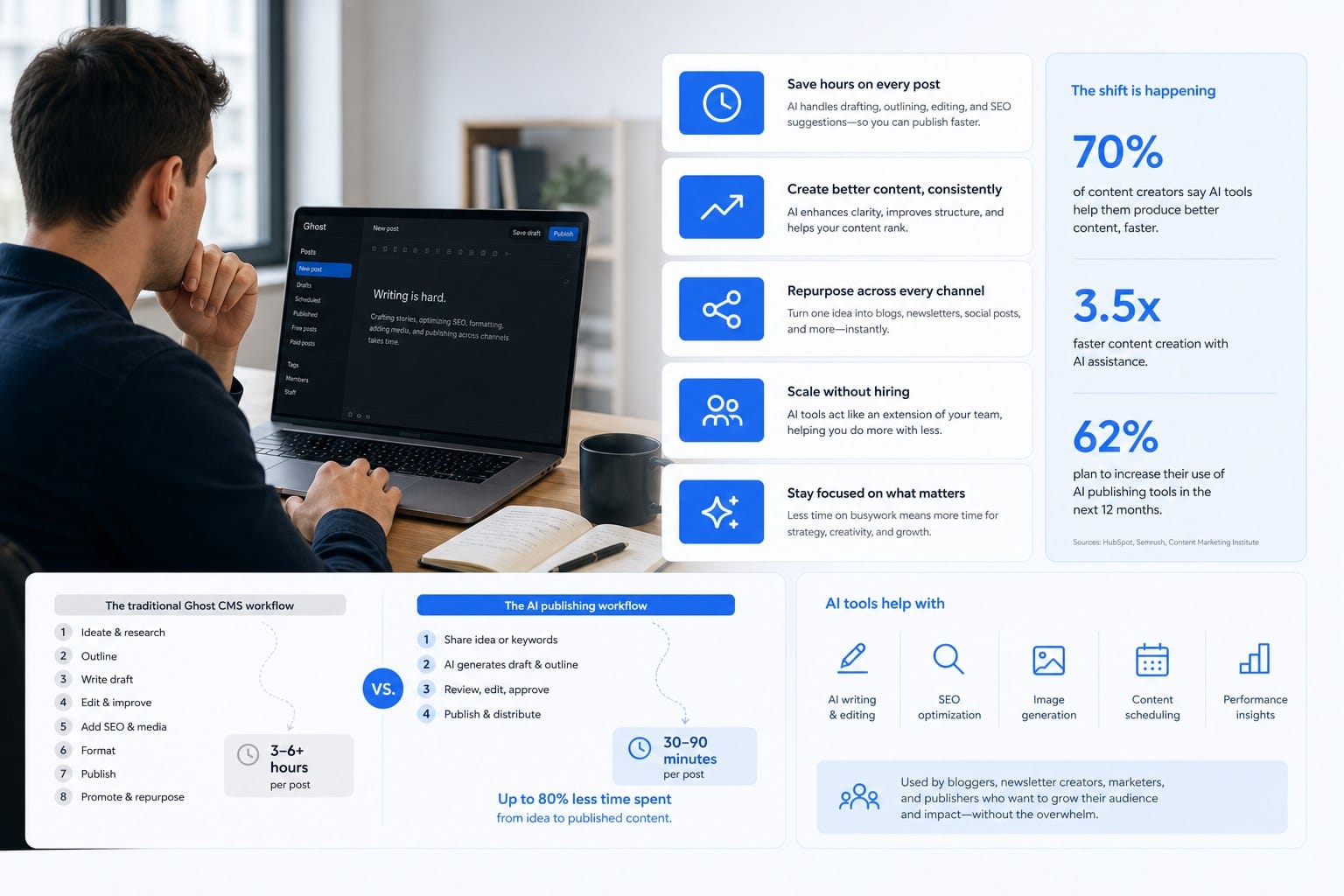
Why Ghost CMS users are turning to AI publishing tools
Ghost is a focused platform. It strips away the bloat you find in WordPress and gives you a lean, fast publishing environment. Developers and content-first brands love it for that reason. But Ghost does not solve the content creation problem. You still need to research topics, write articles, source visuals, and hit publish on a regular schedule. Most site owners fall behind within a few months because that workload is simply too heavy to carry alone.
The gap between having a great publishing platform and actually publishing great content consistently is where AI tools are stepping in. A good AI blog tool does not just generate text. It handles the strategy layer, the research layer, the writing layer, and the publishing layer as one connected workflow. When you integrate that kind of tool with Ghost, the result is a content engine that runs in the background while you focus on your actual business.
Ghost supports this kind of integration natively through its Content API and Admin API. The Admin API is especially important because it lets authorized tools create posts, set metadata, add tags, manage authors, and control publish status programmatically. That means a properly built AI tool can push a finished article into your Ghost site as a draft or even publish it directly, with the featured image already attached and the SEO fields already filled in.
Here is a concrete example of why this matters. Imagine you run a SaaS company. You know that publishing two or three high-quality SEO articles per week would drive real organic traffic growth over twelve months. But you do not have a content team. You have a product to build. An AI blog tool that connects directly to Ghost means you can approve a 30-day editorial calendar on Monday morning, and by the following week, articles are appearing in your Ghost drafts folder, ready for a quick review before going live.
The content strategy piece is just as critical as the writing. If the tool only writes articles and does not plan topics based on keyword opportunity, you end up with content that nobody searches for. A well-designed tool builds the calendar first, identifies which topics have real search demand, then produces the content in sequence. You can read more about how that planning process works in this piece on AI-powered content strategy and editorial calendar planning. Getting that foundation right before any article is written is what separates a random collection of blog posts from a real SEO asset.
For Ghost users specifically, the other reason AI tools are gaining traction is the visual problem. Ghost themes are design-forward. A post that goes up without a quality featured image looks unfinished. Many AI content tools stop at the text layer, which means you still have to go find or create an image before you can publish. The better tools generate on-brand visuals as part of the same workflow, so the article arrives in Ghost complete and ready to go.
One more thing worth naming: consistency is the metric that matters most in content marketing, and it is the one most teams fail at. Publishing twelve articles in January and then nothing in February tells search engines and readers alike that this site is unreliable. An integrated AI workflow removes the bottleneck that causes those gaps, which is the human time and energy required to produce each piece from scratch.
How the Ghost API integration actually works
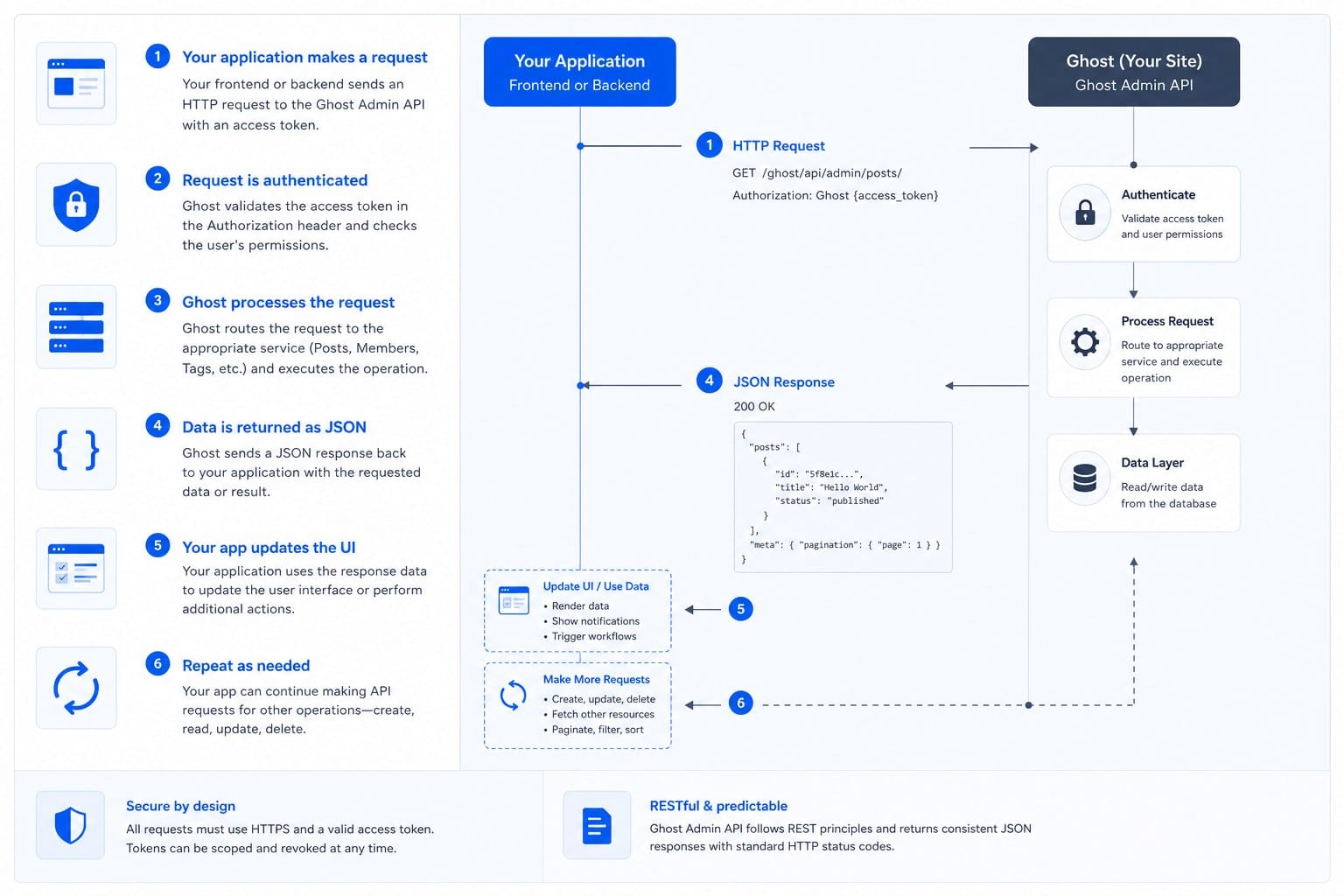
Ghost provides two APIs that matter for this kind of integration. The Content API is read-only and lets external tools pull published posts, tags, and author data. The Admin API is where the real work happens. It is authenticated, write-enabled, and gives a connected tool full control over creating and managing content. When you integrate an AI blog tool with Ghost CMS, you are primarily working through the Admin API.
Here is the step-by-step process at a high level. First, you generate an API key inside your Ghost admin panel. You do this by going to Settings, then Integrations, then clicking Add custom integration. Ghost will generate a Content API key and an Admin API key. You give the Admin API key to your AI tool, and from that point forward the tool has permission to act on your Ghost site as an authorized integration.
The Admin API key has two parts separated by a colon. The first part is the key ID and the second is the secret. The tool uses these to generate a signed JSON Web Token for each API request. If you are using a managed tool like Blogtude, all of that authentication handling happens behind the scenes. You paste in your API key, confirm your Ghost site URL, and the connection is live. If you are building a custom integration yourself, you will need to implement the JWT signing logic manually or use one of Ghost's official SDK libraries.
Once the connection is established, the tool can do the following through the API: create a new post with a title, slug, HTML or Mobiledoc content, excerpt, meta title, meta description, featured image, tags, and author assignment. It can also set the post status to draft or published. For most automated workflows, draft is the safer default. The article lands in your Ghost admin panel where you can review it, make any edits, and then publish with one click. If you trust the output after a few months of seeing the quality, you can switch the workflow to publish directly.
The featured image step is worth explaining in more detail because it is often the thing that breaks integrations. Ghost does not host images through the Admin API the same way it handles text content. To attach a featured image, the tool typically needs to either upload the image file to your Ghost media storage through the images endpoint or reference an external image URL that Ghost will display. Both approaches work, but they behave differently depending on your Ghost hosting setup. A self-hosted Ghost instance with local file storage handles image uploads differently than a Ghost Pro account, which uses a CDN-backed storage layer.
For most users, the cleanest integration is one where the AI tool generates the image, uploads it through the Ghost images API endpoint, and stores the returned URL as the feature_image value on the post object. That way the image lives inside your Ghost installation and does not depend on an external hosting service staying online.
Tags and authors are the other metadata fields that matter for a clean integration. You should set up your standard tag taxonomy in Ghost before connecting an AI tool, and then make sure the tool is assigning the right tags based on the article topic. Ghost uses tags both for organization and for filtering content on the front end, so a poorly tagged post can break your theme layout or make content harder for readers to find.
Keyword research shapes the entire content plan that feeds into this workflow. If you are not sure how to build a keyword-driven editorial calendar before handing it to an AI tool, the article on how to do keyword research for a blog content calendar is a practical starting point. The topics you choose upstream determine the SEO value of every article that gets written and published downstream, so getting that research right before the integration is live is time well spent.
One technical detail that trips people up is the Ghost site URL format. The Admin API requires the full URL including the protocol and without a trailing slash. If your Ghost site is accessible at https://yourdomain.com, that is the string you provide. If Ghost is running on a subdirectory like https://yourdomain.com/blog, the subdirectory needs to be included. Getting this wrong produces authentication errors that look confusing until you realize the URL format is the issue.
Ghost also has a member and subscriber system that some sites use for gated content. If you want AI-generated posts to be member-only, you can set the visibility parameter in the post creation request to members or paid. This makes it possible to have an AI tool populate a members newsletter or a paid content tier automatically, which opens up interesting possibilities for subscription-based Ghost publishers.
Finally, webhooks give you a way to close the feedback loop. Ghost can send a webhook notification when a post is published, updated, or deleted. A smart AI tool can listen for those events and use them to track what has gone live, adjust the content schedule, or flag articles that need attention. This two-way communication makes the integration feel less like a one-way content dump and more like a real publishing system that knows the state of your site.
Setting up Blogtude with Ghost for a fully automated content workflow
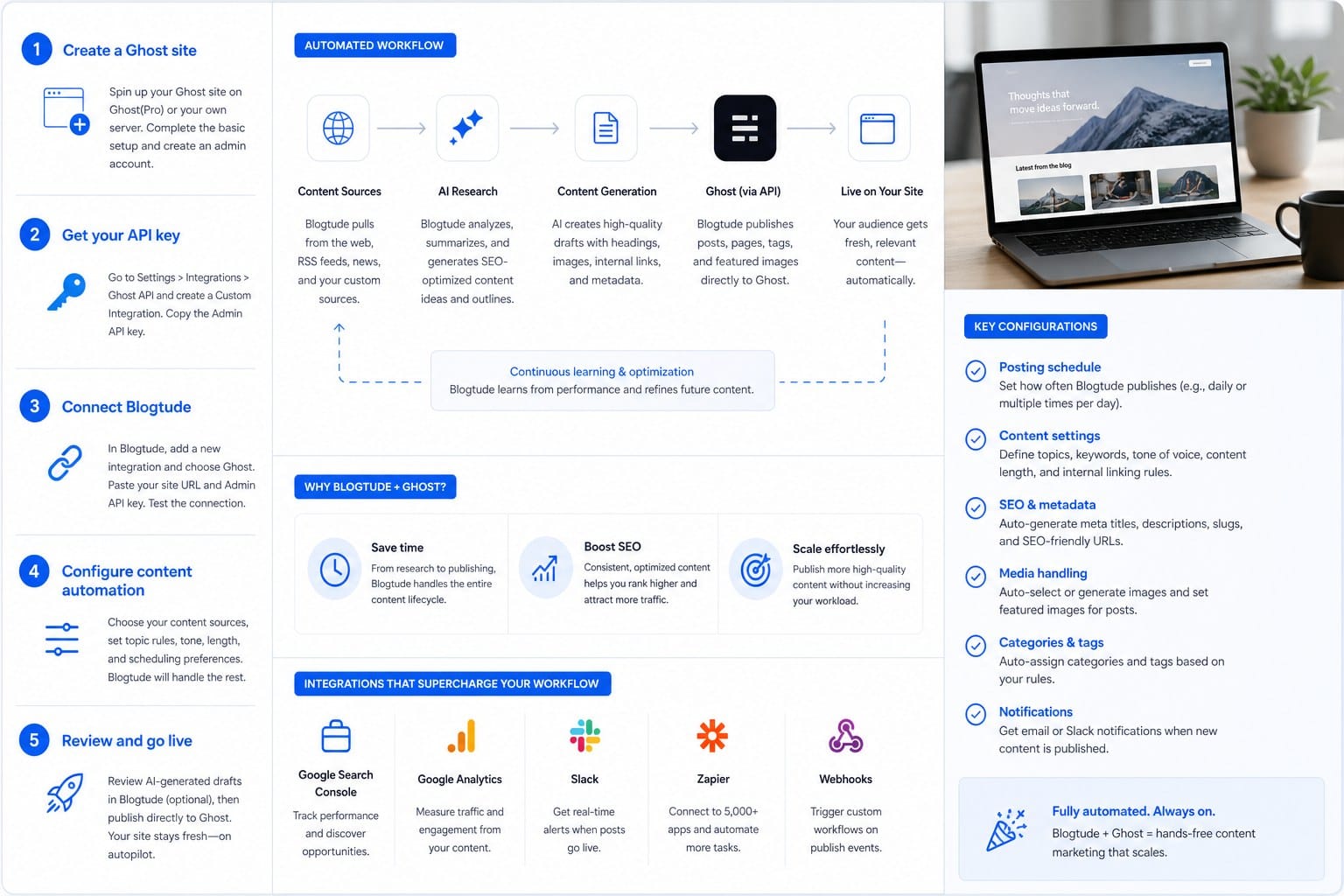
Blogtude is built specifically for this use case. It generates a 30-day content strategy, writes deeply researched long-form articles, creates on-brand visuals, and publishes directly to Ghost. Let me walk through how the setup actually works so you can see what the process looks like in practice.
The first step is building your content strategy inside Blogtude. Before any article gets written, the platform maps out a 30-day editorial calendar based on your niche, your target audience, and keyword opportunities. This is not a generic list of broad topics. It is a prioritized plan that looks at which keywords have realistic search volume for a site at your current authority level, what your competitors are covering, and where the gaps are that you can own with original content. You review the calendar, approve the topics you want, and flag anything that does not fit your brand direction.
That planning phase is important because it means every article that gets written and pushed to Ghost has a defined purpose. It is targeting a specific search query. It fits into a coherent topic cluster. It serves a particular audience segment. The alternative, which is writing whatever comes to mind each week, produces a blog that looks busy but does not build compounding organic traffic over time.
Once the calendar is approved, Blogtude moves into the research and writing phase. Each article goes through a research process before any draft is produced. That means pulling in relevant data, understanding the existing content landscape for the target keyword, and structuring the article to cover the topic thoroughly. If you want to understand what that research depth actually means in practice, the article on what makes a blog article deeply researched: a quality framework for scale breaks down the framework clearly. Thin content that restates surface-level information does not rank well and does not build reader trust, so the research step is where quality is either built in or skipped.
After the article is written, Blogtude generates a featured image that matches your brand style. This is not a stock photo pulled from a library. It is a visual created to match the article topic and your visual identity, which means your Ghost site maintains a consistent look across every post even when the content is produced automatically.
The Ghost connection itself takes about two minutes to set up inside Blogtude. You go into your Ghost admin panel, create a custom integration under Settings and Integrations, copy the Admin API key, and paste it into Blogtude along with your Ghost site URL. Blogtude handles all of the API authentication on its end. From that point forward, every article that completes the production pipeline is sent to your Ghost site automatically.
You can configure the default behavior for how articles arrive. Most users start with drafts so they can review each piece before it goes live. Once you have seen enough articles to trust the output quality and style consistency, you can switch to direct publishing and the content will appear on your live site on the scheduled date without any manual action required.
For Ghost Pro users, the integration works the same way as it does for self-hosted Ghost instances. Ghost Pro sites use the same Admin API and the same authentication flow. The image hosting is handled slightly differently under the hood because Ghost Pro uses its own CDN, but Blogtude manages that transparently. You do not need to configure anything differently based on whether you are on Ghost Pro or self-hosted.
One thing I recommend doing before the first article publishes is reviewing your Ghost tag structure. Decide which primary tags you want to use, create them inside Ghost, and make sure Blogtude knows which tags should apply to which content categories. A clean tag taxonomy keeps your blog organized and makes your Ghost theme display content correctly, especially if your theme uses tags to filter or group articles on category pages.
Another setting worth configuring is the author assignment. Ghost lets you create multiple author profiles, and your AI-generated content can be attributed to a specific author account. Some brands create a dedicated author profile for AI-assisted content and are transparent about it with readers. Others attribute the content to the brand or to a team member who is serving as the editorial voice. Either approach works, and Blogtude lets you set the default author for all auto-published posts.
For digital marketers managing brand blogs on behalf of clients, the Blogtude and Ghost combination creates a reliable reporting baseline. Every article that goes live has a defined target keyword, a publish date, and a clear content brief behind it. You can track organic traffic growth against the content calendar and attribute performance improvements to specific articles with confidence. That kind of structured workflow is much easier to report on than a blog where topics are chosen ad hoc and publish dates are unpredictable.
SaaS founders will find that the 30-day calendar view helps with planning across the whole growth strategy, not just the blog. Knowing what content is coming out over the next month makes it easier to align social media posts, email newsletters, and product announcements around the same themes. The blog becomes a content hub rather than an afterthought.
For independent bloggers who are trying to scale without hiring writers, the economic math changes significantly with this kind of setup. Instead of spending twenty or thirty hours a week on research, writing, editing, and publishing, you spend a few hours reviewing and approving a calendar, and then the pipeline runs. That time savings either goes back into your life or into the higher-level work that actually differentiates your brand, like building an audience, engaging with readers, or developing products.
One honest note about expectations: an integrated AI workflow does not remove the need for editorial judgment. You still need to review articles before they go live, especially early in the relationship with any AI tool, to make sure the content reflects your voice and meets your quality standards. What the integration removes is the mechanical labor, the hours of researching, drafting, formatting, sourcing images, and clicking publish. The thinking work and the quality oversight remain with you, which is where they belong.
Ghost's native SEO features work well alongside an automated content workflow. Ghost automatically generates sitemaps, handles canonical URLs, and gives you meta title and meta description fields for every post. When Blogtude populates those fields with optimized values during the article creation step, you get a post that is technically sound for search engines from the moment it lands in your Ghost dashboard. You are not chasing down missing metadata or fixing slug issues after the fact.
The combination of a structured content strategy, deeply researched articles, on-brand visuals, and automated Ghost publishing is what makes this approach different from simply using a text generator. Each piece of the workflow connects to the next. The keyword research shapes the editorial calendar. The editorial calendar drives the article briefs. The research process shapes the article structure. The article content determines the image concept. The Ghost API delivers the finished package to your site. When all of those steps are handled in one integrated tool, the output is consistent in a way that a patchwork of separate tools cannot match.
Ready to take the next step?
If you are ready to stop wrestling with a blank editorial calendar and start publishing consistent, well-researched articles to your Ghost site automatically, Blogtude is built to make that happen. You can start with a 30-day content strategy tailored to your niche and see exactly what your blog pipeline would look like before a single article is written. Visit https://blogtude.com to get started and connect your Ghost site today.